
Content is the other half
Search settings describe a page. What makes it worth finding is what is on it.
Would you rather we did it with you? See how our team can help with design and SEO.
SEO tools
The technical groundwork is done for you on every page and every vehicle. The parts that make a dealership stand out — titles, landing pages and content — are in your hands, with no plugin and nothing to code.
No card required · Cancel anytime · Everything included
At a glance
Worth knowing
Good SEO for a dealership is not a trick. It is making sure there is a clear, well-described page for each thing a buyer might type.
A particular vehicle
Every vehicle has its own page, and every make and model you stock has a listing page — each with a title and description built from your templates.
A kind of vehicle
Turn a set of filters into a landing page of its own, with your own heading and words around the matching stock.
An answer
Write it as a blog post or a page. Each one is another way for a local buyer to find you. See the blog.
The groundwork
The unglamorous technical work that search engines expect is simply there, on every vehicle and every page you publish.
A list of your live vehicles, pages and posts, kept up to date for search engines.
Variations of an address are folded into one, so near-duplicates do not compete with each other.
Rename a page, a post or a stock section and the old address forwards to the new one.
Vehicles and their prices, your dealership, breadcrumbs, FAQs and blog posts, described in the format search engines read.
Your listings are built on the server, so a search engine sees the full page a buyer sees.
Photos are resized for each screen, served in modern formats and loaded as they are needed.
Every site is served over HTTPS, with the certificate issued and renewed for you.
A title, description and picture for when a page is shared on social media.
Stock SEO templates
You write a title and description as a template, with tokens where the details go. MotoVend fills in each vehicle’s own year, name and more, so every page gets a proper title without you typing each one.
Templates are set per vehicle type, so your trucks can read differently from your cars. The same screen sets the order your stock is shown in.
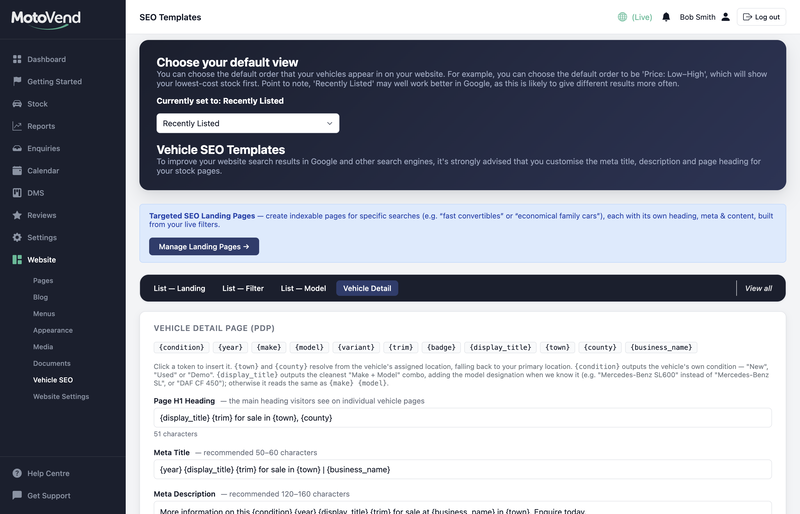
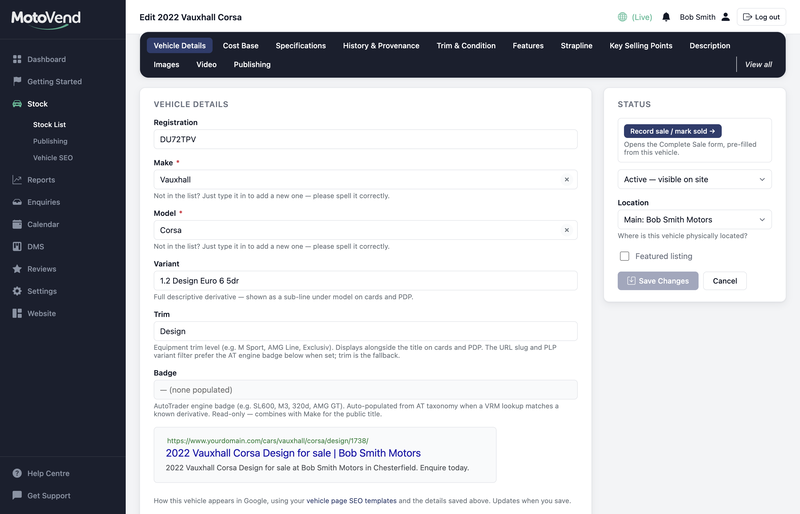
The stock form shows a preview of each vehicle’s search result — the title and description as they will appear — so you can judge a listing the way a buyer will first meet it.
Landing pages
Choose a set of filters — a make, a body style, a price ceiling — and turn that view of your stock into a page of its own.
Write the page heading and the title and description search engines show for it.
Add content that speaks to that buyer, and choose where it sits around the listings.
The page lists whatever matches today, so it keeps itself up to date as stock arrives and sells.
When nothing matches, visitors see a “coming soon” message you write, and the page is put forward to search engines when it has stock to show.
Your stock is handled by templates. Everything else you build has its own settings, one click from the pages list.
Set what search engines show for each page, and the picture used when it is shared. Blog posts have their own search title and description too.
A staff page, a thank-you page, an old offer: untick one box and the page is left out of search results and out of your sitemap, while still working for anyone with the link.
Add an FAQ block to any page and its questions and answers are described to search engines as well as shown to visitors.
Measure it
Your website reports show which stock is drawing attention, so the effort you put into content and search can be judged on what it brings.
Every vehicle with its view count. One person looking once in a day is one view, and search engines and other robots are not counted.
Your stock and its views by vehicle type, body type and fuel — a guide to what buyers want more of.
How many of each kind of enquiry you have had, with the enquiries themselves one click away.
Add your Google Analytics ID in your website settings if you use it. Your cookie banner looks after consent.
Search settings describe a page. What makes it worth finding is what is on it.
Would you rather we did it with you? See how our team can help with design and SEO.
Start free with no card, or talk to us first – whichever suits you.
Prefer to talk? Call 01246 541933