
Website builder
A dealer website builder you actually control
MotoVend gives you a true page builder: sections, layouts and 32 content blocks, arranged your way on as many pages as you like, on your own domain. Edit in a live preview, check it on a phone, and publish when you are ready. A website that grows with every page you add.
No card required · Cancel anytime · From a company serving the motor trade since 2006
20 years in the motor trade
Built on what two decades of dealer websites have shown
MotoVend is built by Creativity Sells Ltd, a company that has made websites and software for motor dealers since 2006. The builder is shaped by what those years have shown about how buyers choose a dealer, and what keeps a website selling.
What the years have shown, and how the builder answers it
Stock is what buyers come for
Your stock sits at the heart of every page, and stock blocks keep themselves up to date.
Buyers decide on a phone
Every site works on a phone, and Call and Enquire stay in reach at the foot of each vehicle page.
Monthly cost and part-exchange come first
Finance figures, where they apply, and a part-exchange form sit on the vehicle page itself.
Being found takes groundwork
Sitemaps, clean addresses, redirects and structured data are done for you.
A website has to keep changing
Add pages, posts and offers yourself, whenever you like, without waiting on anyone.
A blank page is the hardest start
Your account begins with a ready-built site for your kind of dealership.
Why a proper builder matters
Every page you add is another way to be found
Buyers don’t just scroll through search results any more. They ask Google, ChatGPT and other AI assistants questions like “who sells used 4x4s near me with finance?”, and the answers are built from websites that answer them. A website you can add to is a website that can grow.
More pages, more chances
A finance page, a part-exchange page, a buying guide: each one gives search engines and AI something new to show when a buyer asks a question.
Answers AI can use
Pages that answer a question in plain words are the ones search engines and AI answers draw on. FAQ blocks, and the structured data MotoVend adds, help them read your site.
Fresh, not forgotten
A website that keeps changing gives buyers, and search engines, a reason to come back. A new post or page every few weeks keeps yours current.
Working while you sleep
Write a page once and it can keep bringing buyers to you for months.
AI answer
Several local dealers have used 4x4s in stock. Your Dealership lists its current 4x4s with photos and prices, explains how buying on finance works, and takes part-exchanges.
Sources
- yourdealership.co.uk/used-4x4s
- yourdealership.co.uk/finance
- yourdealership.co.uk/blog/buying-a-used-4x4
An example of how an AI answer can draw on a dealer’s own pages: a landing page, a finance page and a blog post.
How a page is built
Three layers, no code
Every page is made of sections, each section holds a layout, and each column of a layout holds blocks. You add them and fill them in — that is all there is to learn.
Sections
Full-width bands running down the page.
- A background colour or picture, with an overlay to keep text readable
- A straight, angled, curved or wave edge top and bottom
- Padding, margin and light or dark text
- An anchor name, so a button can jump straight to it
Layouts
Sit inside a section and decide the columns.
- One to five columns, or a split such as two-thirds and one-third
- Tabs, an accordion or a carousel
- Normal, full or narrow width
- Sticky, overlapping or staggered columns
Blocks
The content itself, dropped into a column.
- 32 blocks: text, pictures, your stock, forms, reviews and more
- Stock blocks stay up to date by themselves
- Each stock block can show a different vehicle type
- Duplicate any block, layout or section in a click
Any layout you can picture
Blocks do not just stack in a single column. Choose two, three, four or five columns, a split with one side wider, or tabs, an accordion or a carousel — then place a different block in each: an image beside text, three reasons to buy in a row, a stock search next to your opening hours.
- Line columns up or stretch them to equal heights, set the gap between them, or let one overlap another
- Make a column sticky so it stays in view while the rest scrolls
- On a phone, let columns swipe sideways or reverse their order
- Hide a column on mobile or on desktop
The block library
32 blocks, ready to drop in
Mix and match them to build any page a dealership needs. The stock blocks read from your live inventory, so they never need updating by hand.
Your stock
- Stock search
- Stock search hero
- Featured stock
- Latest stock
- Browse by budget
- Available makes
- Available body styles
Words and pictures
- Text
- Section intro + buttons
- Button
- Image
- Image + text
- Image cards
- Image CTA
- Gallery
- FAQ
- YouTube video
- Latest articles
- Spacer / divider
Banners and calls to action
- Hero banner
- Banner carousel
- Call to action
- Parallax CTA
- Parallax break
- USPs
Trust and enquiries
- Customer reviews
- Trustpilot reviews
- Contact form
- Sell your vehicle
- Mailchimp signup
- Opening hours
- Map
The Stock search hero can fade between up to four pictures. Buttons can link to a page, a document or another website, and can sit inside your text as well as in a block of their own.
Editing and publishing
Take your time. Nothing is live until you publish.
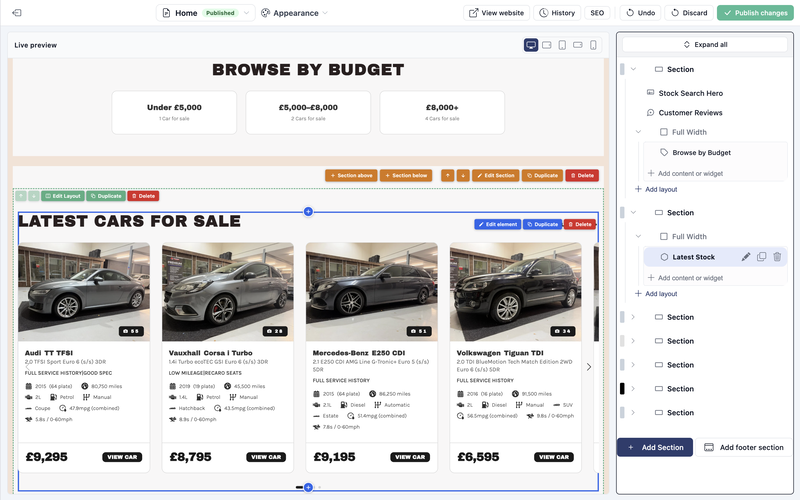
The editor shows a live preview of the page on one side and an outline of it on the other. Click anything in the preview to change it, drag rows in the outline to move them, and switch the preview between desktop, tablet and mobile to see each one.
Every change is saved to a working copy as you go. Your live website stays exactly as it was until you click Publish changes.
- Undo reverses your most recent change
- History keeps the page’s last three versions to go back to
- Discard returns to the live version
- Publish all changes puts several edited pages live in one go
Fine control on every block
Open any block’s settings and the same five controls are there.
Spacing
Space above and below, set per block.
Boxed panel
Put a block on its own panel, with its own padding and colours, and a title strip across the top if you want one.
Card and button colours
Recolour the cards a block shows, such as vehicle or review cards, and its buttons, including on hover.
Visibility
Show a block everywhere, or hide it on mobile or on desktop.
Animation
Fade, slide or zoom a block in as it scrolls into view. Visitors who ask for reduced motion do not see it.
Design
Your brand, across the whole site
Change how the whole website looks in a few clicks. Nothing changes on your live site until you save, and you can preview first.
Seven design styles
Balanced, Structured, Sculpted, Layered, Dynamic, Expressive and Kinetic, each with its own motion, depth and finishing touches. Preview your own site in a style before you commit.
Colour scheme generator
Type your main brand colour and a matching scheme is built for you. Fine-tune any colour, or start from a ready-made preset.
Font pairs
Pairs of fonts that work together, with control over letter spacing and capitalised headings.
Shape and spacing
Page width, breathing room, vehicle-card size, rounded or square corners, shadows and hover effects.
Header and footer
Arrange the top and bottom of every page, including where the stock search box sits.
Announcement bar
One line above your header on every public page, with an optional link, an end date and your own colours.
Footer section
A section built from ordinary blocks, shown above the footer on every public page.
Menus
Edit the links along the top and bottom of your site.
Logo and favicon
Your logo, and the small icon in the browser tab.
Media library
Upload, organise in folders and describe your pictures with alt text, or search for free photos and add them in a click.
Public documents
Put PDFs at an address on your own site, such as a price list or your terms. Replace a file and its address stays the same.
As many pages as you need
Finance, about us, meet the team, a page for each service — add a page, build it from the same blocks, and publish it when it is ready.
New pages start as drafts
Nobody sees a page until you publish it. Duplicate an existing page to start from something you already like.
Change an address without breaking links
Rename a page’s web address and the old one redirects to the new one automatically.
Some pages build themselves
Your stock pages, your Reviews page, a Previously Sold page and your blog are generated for you, and kept up to date.
Ideas to start with
Pages worth building
Every one of these can be built from the blocks above, and each gives buyers and search engines another reason to choose you.
Finance explained
How buying on finance works with you, in plain words. Show finance only if you are authorised to offer it.
Part-exchange and selling
A page with the Sell your vehicle form, so buyers and sellers can send you their details at any time.
Buying guides
What to check on a used car, choosing a first motorhome, towing basics: the questions buyers type into search, answered by you.
Pages for popular searches
Automatic cars under £10,000, or four-berth motorhomes: landing pages that list the matching stock under your own introduction. More
Your story and your team
Who you are, how long you have been trading and the people buyers will meet. Trust often decides where someone buys.
A blog that keeps going
New arrivals, offers with an end date, local news and advice. Every post is another page that can be found. More
Search and AI, in plain English
How search engines and AI choose a dealer
Nobody can promise a place at the top of Google or a mention in an AI answer. But the engines look for the same few things, and MotoVend gives you the tools for each.
They read your pages
No page, no answer. The more of your buyers’ questions your website answers, the more often it can be shown.
They look for clear answers
Answer the question in the first line. An FAQ block lays questions and answers out in a way search engines can read.
They trust fresh, accurate pages
Keep stock, prices, opening hours and offers up to date. Stock pages update themselves, and a post can come down on its end date.
They favour local and specific
Say where you are and what you sell. A page for the stock buyers search for does more than one that tries to cover everything.
The tools that help
Live in four steps
From sign-up to a stocked website you are proud to publish.
Create your account
Start your free trial — no card required. Your account begins with a ready-built site for your kind of dealership, with demo stock to show how it looks.
Make it yours
Work through the short setup checklist: your details, your logo, your colours, your pages and menus.
Add your stock
Delete the demo stock, then bring yours in from AutoTrader or add vehicles by number-plate lookup — your stock blocks fill straight away.
Publish
Go live on your MotoVend address, then add one DNS record to move to your own domain. SSL is set up for you.
Website builder FAQs
Build your dealer website today
Start free with no card, or talk to us first – whichever suits you.
Prefer to talk? Call 01246 541933